Thrid-party Quarto Support for Obsidian
I wondered if I can actually use a proper markdown editor to edit my Quarto site. After searching for it in Obsidian third-party extensions store, I found one called qmd as md, which seems perfect for my purpose.
Installation
It seems that Obsidian manages extensions by workspaces. After opening my site folder in Obsidian, I clicked on the settings button, installed and enabled the plugin.

After installing, I was able to view and edit .qmd files in a WYSIWYG style in Obsidian.
Notes on Editing
There are some differences between directly editing in VSCode tho.
Metadata Block ---
I can directly type --- in the start of the .md file to add metadata. However, when I first try to add categories, it didn’t show what I wanted: the desired format in plain text is
categories: ["quarto", "obsidian", "diary"]However, in default behavior, I found that it is in text mode (instead of list mode) and it shows something like
categories: 'quarto, obsidian, diary'To fix this, click on the little logo before the key, and change the mode.
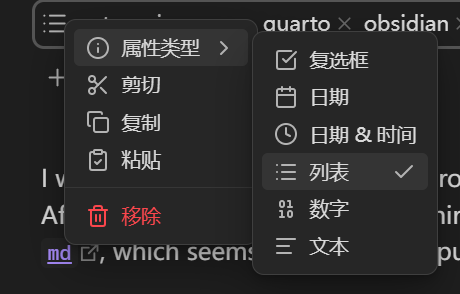
categories.
Inserting Pictures and Links
By default, directly pasting images in Obsidian will paste the image in root folder, and add a link as the format of [[xxx.png]]. However, the standard format for Quarto is something like {#fig-xxx}, which requires manual changes. It autochanges to the correct format after I changed it once tho. It’s worth noting that in Obsidian we can directly use ![text][path], but it’s not supported by Quarto. Also, Obsidian will not show the captions under the pictures.
Also, the autolink system with [[]] is partially broken, as Quarto uses a slightly different file path reference system. For example, to add index, it’s possible to directly type [[index.qmd and select blog/index.qmd to create a [text](path) format; however, I have to manually add a / in the front for Quarto to actually resolve the link target; otherwise it will give you a warning of Unable to resolve link target: blog\posts\blog\index.qmd during the rendering process, and you can actually see the path difference.
Support for Pure Markdown Files
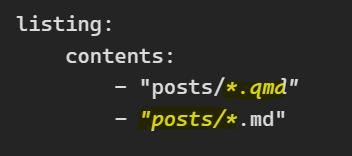
This page is written in a pure .md file. In theory Quarto supports rendering .md files, but I have to manually add a value to the index file:
listing:
    contents:
        - "posts/*.qmd"
        - "posts/*.md"
which shows italic styled texts between *s in the code block of this page.
Embedding .ipynb Files and Code Blocks
The extension seems not to support showing .ipynb blocks; highlights are also not supported. See the example code cell here. It’s extremely slow when rendering, because Quarto needs to initiate python3 kernel every time. Personally I don’t think it’s bettern than just write an isolate .ipynb file in VSCode and embed it with pre-run results. You can tell Quarto to not render it unless it’s changed tho, using this option in _quarto.yml:
execute:
    freeze: auto  # re-render only when source changes
.obsidian Folder
Obsidian will create a .obsidian folder in the root folder. I prefer adding it to .gitignore.
Other Formatting Issues
You need to leave a blank line above and under the # titles, or they will not be rendered as titles.